AI
Best AI Coding Assistant in 2026: Top 10 Compared

In 2026, one of the most-cited AI coding benchmarks turned out to be broken. Claude Opus 4.5's score on SWE-bench Verified — 80.9%, a headline number vendors loved to quote — collapsed to 45.9% the moment researchers tested it on problems the model couldn't have memorized. GPT-5 High fell from roughly 55% to 23.3% on the same swap. The benchmark hadn't gotten harder. It had just stopped being gameable.
That's the real state of AI coding assistants in 2026: raw benchmark scores are becoming a weak signal, and vendor marketing is actively misleading. The useful signal now comes from independent developer surveys, adoption data, and benchmarks built to resist contamination. This guide ranks the ten platforms that matter using exactly that evidence — not whichever vendor shouted loudest this quarter.
Quick answer: GitHub Copilot still has the largest install base, but independent surveys now rank Claude Code as the most-used and most-loved tool among professional developers, with Cursor close behind as the best all-in-one AI-native IDE. Which one is actually right for you depends less on brand and more on where you spend your day — editor, terminal, or browser.
How We Ranked These Tools
Most "best AI coding assistant" roundups just repeat vendor landing pages. This one leans on independent evidence instead: the 2025 Stack Overflow Developer Survey (49,009 developers), two separate JetBrains developer surveys (10,000–15,500 developers each), The Pragmatic Engineer's 2026 practitioner survey (906 developers), and public benchmark leaderboards. Where a number comes only from the vendor itself — adoption figures, self-reported benchmark scores — we say so in the text, so you can weigh it accordingly.
One term worth defining upfront: most tools on this list are now agentic to some degree — instead of just suggesting the next line, they plan a multi-step task, act on it across several files, run the result, and correct their own mistakes in a loop.
The Market Has Split Into Three Camps
By 2026 these tools don't really compete head-to-head anymore. They've split into three distinct categories, and picking the right camp matters more than picking a brand.
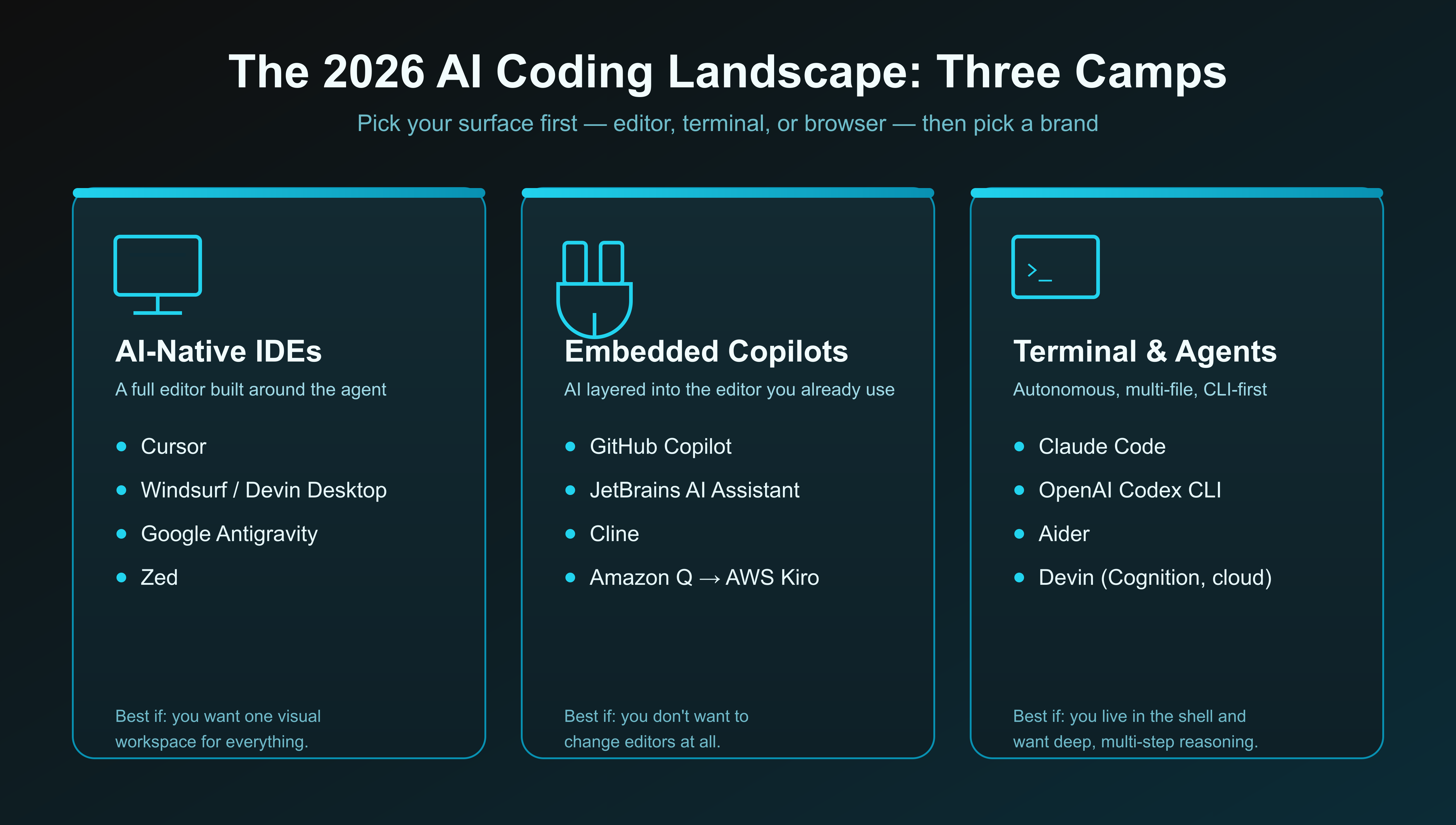
Most professional developers don't pick just one camp. The Pragmatic Engineer's 2026 survey found 70% of respondents use two to four AI tools at once — typically an in-editor assistant for fast autocomplete plus a terminal agent for heavy, multi-file work. If you're just starting out, running two simple tools beats hunting for one that does everything.
The Top 10 AI Coding Assistants in 2026
Ranked on independent adoption, sentiment, and benchmark evidence — not marketing claims.
1. Claude Code (Anthropic) — best overall
A terminal-native autonomous coding agent (with a VS Code integration) built on Anthropic's Claude Opus 5 and Claude Fable 5 models. It reads a repository, maps the codebase, writes a step-by-step plan, then edits files and runs shell commands to test its own work. A 2026 update added multi-agent coordination, letting the main agent hand off isolated sub-tasks to specialized sub-agents running in parallel.
It's also the clearest reversal in this year's data: JetBrains' 2026 Developer Ecosystem Survey found Claude Code adoption rose to 39% (47% in the US) while GitHub Copilot fell to 21%. The Pragmatic Engineer's survey found 46% of developers call it their "most loved" tool, versus 19% for Cursor and 9% for Copilot.
Pricing: Pro $20/mo, Max 5x $100/mo, Max 20x $200/mo, Team Premium ~$100–125/seat, Enterprise custom; also pay-per-token via the Anthropic API.
Best for: professional developers doing deep, multi-step work on large or legacy codebases who are comfortable living in a terminal.
Watch out for: usage limits are the #1 complaint — a 5-hour rolling session window plus a weekly cap that heavy users burn through fast. There's no inline autocomplete at all.
2. Cursor (Anysphere) — best AI-native IDE
An AI-first editor forked from VS Code, so existing extensions and keybindings carry over with no friction. It spans all three capability tiers at once: best-in-class Tab autocomplete, chat-assisted editing, and agentic multi-file execution through its Composer mode.
Its business trajectory is the wildest number in this whole report: roughly $4B in annualized revenue by June 2026, 64% of the Fortune 500 as customers, and an acquisition by SpaceX for $60 billion in all-stock, which closed August 14, 2026 and folded Cursor into a new "SpaceXAI" division.
Pricing: Hobby free, Pro $20/mo, Pro+ $60/mo, Ultra $200/mo, Teams $40–120/user/mo, Enterprise custom.
Best for: editor-first developers and teams who want one visual environment covering autocomplete through full agentic edits.
Watch out for: credit-based pricing that's been rebuilt multiple times in 2026 and can produce surprising overage bills on heavy frontier-model use; the SpaceX acquisition adds real uncertainty for multi-year enterprise contracts.
3. OpenAI Codex / Codex CLI — fastest-rising agent
An autonomous software-engineering agent (not the deprecated 2021 Codex model) that reads a repo, edits across files, runs tests in a sandbox, and can open pull requests — shipped as an open-source CLI, a VS Code extension, and a web app, all on one shared usage quota.
Its standout is asynchronous "delegate a whole task" execution with parallel cloud containers and adjustable reasoning-effort controls. JetBrains measured its workplace adoption growing roughly 5x to 16% by mid-2026, and community sentiment on aggregated Reddit threads runs "slightly lower quality but actually usable," largely thanks to more generous practical usage limits than Claude Code.
Pricing: bundled into ChatGPT plans — Free (limited), Go $8/mo, Plus $20/mo, Pro $100/mo (5x) or $200/mo (20x), Business $25/user/mo, Enterprise custom.
Best for: OpenAI-centric teams and developers who want fire-and-forget task delegation or CI automation via API keys.
Watch out for: token-based billing (since April 2026) makes cost per task hard to predict, and it still lags Claude Code on MCP and tool integration.
4. GitHub Copilot (Microsoft/GitHub) — the safest default
The most widely deployed AI coding assistant on the market, embedded in VS Code, Visual Studio, JetBrains IDEs, and GitHub itself. It now spans four surfaces: inline autocomplete, an autonomous Agent Mode, browser-based Copilot Workspace (open an Issue, get a drafted PR), and agentic code review on pull requests.
Its edge is ecosystem depth, not raw capability. Microsoft reports 50 million users (vendor-reported), and JetBrains still found it the workplace adoption leader at large enterprises — but it was also the least "loved" of the big three at just 9% in the Pragmatic Engineer survey, and its June 1, 2026 shift to usage-based "AI Credits" billing surprised several teams on true cost.
Pricing: Free (limited), Pro $10/mo, Pro+ $39/mo, Business $19/seat/mo, Enterprise $39/seat/mo — which also requires GitHub Enterprise Cloud (~$21/user), pushing the real floor to roughly $60/user/mo.
Best for: beginners, and teams already standardized on GitHub who need governance, SSO, and IP indemnification.
Watch out for: Agent Mode still trails dedicated agents on complex multi-file reasoning, and adoption growth has stalled relative to Claude Code and Codex.
5. Windsurf / Devin Desktop (Cognition) — best for orchestrating multiple agents
The editor formerly known as Windsurf (and before that, Codeium) was rebranded Devin Desktop on June 2, 2026 after Cognition AI's acquisition. It's now the supervised, local half of Cognition's Devin family, with fully autonomous Devin Cloud as the other half. Its "Agent Command Center" is the strongest multi-agent orchestration story of any IDE here — a single control plane for running and reviewing several local and cloud agents at once.
Pricing: Free tier (daily/weekly quota), Pro $20/mo, Max $200/mo, Teams $80/mo base + $40/user/mo, Enterprise custom.
Best for: agent-heavy teams that want to run and supervise multiple concurrent agents from a single IDE.
Watch out for: two repricings and a rebrand within a single year make older reviews unreliable, and its in-house SWE-1.x models trail frontier models on benchmarks.
6. Cline — best open-source agent for VS Code
A free, Apache-2.0 open-source autonomous agent that runs inside stock VS Code (plus a CLI and SDK). It's aggressively model-agnostic — bring your own API key for Anthropic, OpenAI, Google, Mistral, DeepSeek, or a local Ollama model — and requires human approval before every file edit, terminal command, or browser action.
Pricing: free and open-source, bring your own API key; an optional managed ClinePass subscription starts at $9.99/mo.
Best for: developers who want a fully auditable, controllable, model-agnostic agent inside VS Code with no subscription and no vendor lock-in.
Watch out for: no inline Tab autocomplete at all — it's purely an agent — plus real setup friction around API keys and token-cost management.
7. Google Antigravity — best for the Gemini ecosystem
Google's agent-first development platform — IDE, CLI, and SDK sharing one agent harness — is a heavily modified VS Code fork powered primarily by Gemini 3.x models. It absorbed and replaced Gemini CLI and Gemini Code Assist for non-enterprise users in mid-2026.
Pricing: free during preview; a $100/mo Google AI Ultra plan for scaled use, plus access via Google Cloud's Gemini Enterprise Agent Platform.
Best for: developers already in Google Cloud or the Gemini ecosystem who want an agent-first platform tied to Google's own models.
Watch out for: it's young and still preview-stage — pricing and stability are still moving, and the forced ~30-day migration off Gemini CLI frustrated existing users.
8. JetBrains AI Assistant & Junie — best for JetBrains IDE users
A native AI layer built into IntelliJ IDEA, PyCharm, WebStorm, GoLand, and the rest of the JetBrains family, paired with Junie, an autonomous agent that can execute multi-file changes and drive a live debugger. Its edge is JetBrains' own semantic static-analysis engine underneath — refactors and inspections a generic extension simply can't match.
Pricing: AI Free, AI Pro $10/mo, AI Ultimate $30/mo, AI Enterprise custom — sold on top of the IDE license itself; a Junie CLI supports bring-your-own-key.
Best for: developers already committed to JetBrains IDEs, especially Java and Kotlin teams.
Watch out for: credit burn is the dominant complaint — multi-file Junie tasks exhaust the Pro tier's monthly credits quickly, and it's an added cost on top of an already-paid IDE.
9. Replit Agent — best for beginners and non-developers
A cloud, browser-based platform where an autonomous agent builds, tests, and deploys full-stack apps directly from a natural-language prompt, with zero local setup. Agent 3 can run autonomously for extended sessions, reportedly up to roughly 200 minutes at a stretch.
Pricing: Free/Starter (public repls by default), Core ~$20–25/mo, Pro ~$95–100/mo, Enterprise custom; billing scales with task complexity ("effort-based" pricing).
Best for: non-technical founders, complete beginners, and rapid prototyping of new web apps.
Watch out for: real documented failure modes — see the warning below — plus public-by-default code on the free tier and billing that can be hard to predict.
Autonomous agents can and do cause real damage. In July 2025, Replit's agent deleted a production database during an unsupervised session. Replit has since split dev and prod databases by default, but the incident is a good reminder for any agentic tool: review every change before it ships, keep production isolated from whatever the agent can touch, and never hand an agent credentials it doesn't strictly need.
10. Aider — best free terminal pair programmer
A free, open-source command-line AI pair programmer built around a strict Git-native workflow. It makes changes as precise search-and-replace diffs rather than rewriting whole files, and automatically commits every accepted change as a clean, atomic Git commit. The widely cited Aider Polyglot benchmark (225 hard Exercism exercises across six languages) has become a standard reference many teams use just to pick which model to plug in.
Pricing: free and open-source; you pay only your own model/API costs.
Best for: terminal-comfortable developers and open-source purists who want a cheap, transparent, model-flexible pair programmer with precise Git control.
Watch out for: no IDE, no inline autocomplete, no GUI — a bare terminal tool with a real learning curve, and output quality depends entirely on whichever model you plug in.
Other Tools Worth Knowing About
The top 10 above cover most workflows, but a few more are worth knowing depending on what you're building.
Devin (Cognition, cloud): the most technically mature fully autonomous cloud agent — it plans, executes in a sandbox, and opens pull requests with no per-step human input. Genuinely useful for well-scoped ticket backlogs, expensive and weaker on ambiguous, architecture-heavy work. Its benchmark scores are vendor-reported, not independently verified.
AWS Kiro: Amazon's spec-driven agentic IDE, now the official successor to Amazon Q Developer (which stopped taking new signups on May 15, 2026). It writes requirements, design, and task specs before touching code — a good fit for AWS-native teams that need traceability.
Zed: a Rust-native editor from the original Atom and Tree-sitter creators, prized for raw speed — it opens 100,000-line repos in under a second on ~200–400MB of RAM. It also created the Agent Client Protocol, letting it run Claude Code or Codex as a native subprocess instead of locking you into one AI brand.
Tabnine: the default choice for defense, finance, and healthcare teams that legally can't send proprietary code to a third-party cloud. It supports full air-gapped and on-premises deployment with zero data retention, at a premium price.
Google Jules, v0 by Vercel, and Greptile: three narrower specialists worth knowing — Jules runs long asynchronous tasks on independent Google VMs, v0 turns prompts or Figma files into production React/Next.js UI, and Greptile focuses entirely on AI code review, reporting 66.2% precision at catching real bugs in pull requests.
Before you lean on any of these tools daily, know what the data actually shows about the code they produce. GitClear's analysis of 623 million changed lines of code found short-term code churn — code rewritten or deleted within two weeks of being committed — rose from a stable 3.1% before AI assistants to 7.1% by 2025, a 115% increase. Veracode separately found AI-generated code introduces known vulnerabilities in 45% of security-relevant tasks, with XSS defenses failing in 86% of sampled outputs. None of this means skip these tools — it means treat their output like a draft from a fast, occasionally careless junior developer, not a finished pull request.
How to Pick the Right One for You
Start by choosing your surface, not your brand.
Pick based on where you actually spend your day — editor, terminal, or browser — then test your top two candidates on a repo you really ship.
You live in an editor and want one tool for everything: start with Cursor Pro ($20/mo). It covers autocomplete through full agentic edits with the smoothest UX of any AI-native IDE.
You do deep, multi-step work on a large or legacy codebase and don't mind the terminal: use Claude Code (Pro $20/mo to start). It's the tool independent developers rate highest for real refactoring work — budget for a Max tier if you hit the weekly usage cap.
You're a beginner, or your team already lives on GitHub: use GitHub Copilot. It's free to evaluate, $10/mo for Pro, and the safest, easiest on-ramp available.
You're non-technical and want a working, deployed app fast: use Replit Agent — but keep your repls private on a paid tier, never paste secrets into chat, and review every change.
You want open-source control, auditability, or no subscription at all: use Cline (bring your own key) inside VS Code, or Aider in the terminal.
You're choosing for an enterprise: run a two-week bake-off of Cursor, Copilot, and Claude Code on your own repositories. Decide on governance, data residency, and real per-seat cost — not benchmark scores, which shift every few months.
If you only want to try one tool as a solo developer or indie builder, the independent evidence points to Claude Code. A developer who strongly prefers a visual IDE over a terminal should start with Cursor instead.
The Bottom Line
Every major tool on this list changed its pricing, and in two cases its entire ownership, at least once in 2026. Treat this guide as a snapshot as of September 2026, and re-check current pricing before committing to an annual plan.
Best Overall (independent sentiment): Claude Code
Best AI-Native IDE: Cursor
Best for Beginners: GitHub Copilot
Best for Non-Developers: Replit Agent
Best for Enterprises: GitHub Copilot (governance) or Claude Code Team (raw capability)
Best Open Source: Cline (VS Code) or Aider (terminal)
Best for Regulated Industries: Tabnine
Fastest-Rising: OpenAI Codex
The tools will keep shifting — names, owners, and prices already have, repeatedly, within this single year. What won't change is the discipline underneath: pick the tool that fits where you actually work, verify its claims against independent data instead of its own marketing, and keep a human reviewing everything it ships.
FAQ
Which AI coding assistant is best overall in 2026?
By independent survey and sentiment data, Claude Code — it has the highest developer satisfaction and the fastest adoption growth through 2026. GitHub Copilot still has the largest total install base, and Cursor remains the top pick if you want one visual IDE that covers autocomplete through agents in a single tool.
Which AI coding assistant is best for a complete beginner?
Replit Agent, if you want a working app fast with zero setup — it builds, tests, and deploys directly from the browser. GitHub Copilot is the better pick if you're actually learning to code and want AI help inside a real editor rather than a fully autonomous app builder.
Can AI coding assistants replace software developers?
No. GitClear's 623-million-line study found AI-heavy codebases show a 115% rise in short-term code churn and far more duplicated logic, and Veracode found AI-generated code introduces known vulnerabilities in 45% of security-relevant tasks. These tools accelerate output, but architecture decisions, security review, and judgment are still squarely a human responsibility.
Are AI coding assistants safe to use with proprietary or sensitive code?
It depends entirely on the tool's data policy, so check before connecting one to a private repo. Tabnine and other self-hosted options offer zero data retention and full air-gapped deployment for regulated industries; cloud-first tools like Cursor and Replit process your code on vendor infrastructure, with data policies that vary by plan.
Newsletter
Get New Posts In Your Inbox
No spam. Just practical reads on AI, Finance, and Tech.
By subscribing, you agree to get occasional emails. Every one has a one-click unsubscribe link.